
> 5 million in-stock compounds Whether you’re diving into computational chemistry or leading screening efforts, MolPort equips you with indispensable tools for: Diversity Analysis Clustering Virtual Screening and Docking Machine Learning Databases are provided as SD files or SMILES format for easy use with almost all computational chemistry software. 2D Compound Data Delve into Molport’s curated and standardized commercially available compound 2D database. Pick the version that is most suitable to your needs, starting from…

Wishing you a Happy New Year! As we dive into 2024, we at Molport want to express our heartfelt thanks to our valued partners and customers. Here’s to another year of discovery, collaboration, and achieving groundbreaking milestones together! May the New Year bring you renewed energy, fresh perspectives, and the resources needed to propel your research to greater heights. We’re super excited about what 2024 has in store and look forward to contributing to your…
🎄 Holiday Notice! 🎄 In celebration of Christmas and New year, MolPort offices will be closed on December 25th & 26th and on January 1st. 🌟 As December is bustling with activity, our suppliers and couriers are working tirelessly to fulfill orders. To ensure timely delivery, we kindly encourage you to place your orders in advance. 📦 Please take a moment to review the shipment cutoffs for our major suppliers, as holiday schedules may vary.…
Are you planning to order larger compound sets and have them delivered before the year-end holiday break? Given the increased volume of orders in December, along with busy suppliers and couriers, we highly recommend placing your orders well in advance to ensure timely delivery and avoid any unexpected delays, such as those that may occur in the purchasing department. Please, include enough time build and optimize the list of compounds to be ordered, to negotiate…
Molport is committed to continually enhancing our services to better support your research endeavors. Our primary goal is to provide you with improved solutions and greater efficiency. With that in mind, we are pleased to inform you that over 1000 chemical compounds are now available for next-day shipment. This means you can access the compounds you need quickly and conveniently, aiding the progress of your research. To view the list of available compounds, simply visit…
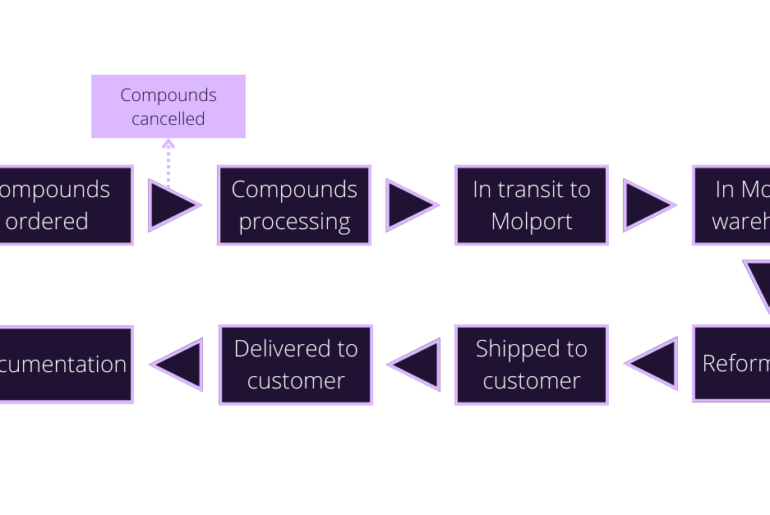
With the MolPort order tracking system, customers can see where their order is at any point in time – from when an order is placed until it is delivered, together with invoice details and packing list. Transparency to give you peace of mind. The order tracking service is available to everyone who places an order with us. Registered users at molport.com have access to their complete order, including order packing data download, product list,…
We are pleased to announce that Molport has expanded its database of available compounds with the addition of several new chemical suppliers. This enhances Molport’s extensive collection and offers an even wider diversity of chemical structures to meet your research needs. These new suppliers add an array of high-quality compounds to our platform, so you can exploit the latest advancements in chemical synthesis. These compounds are sourced from reputable suppliers worldwide, maintaining our commitment to…
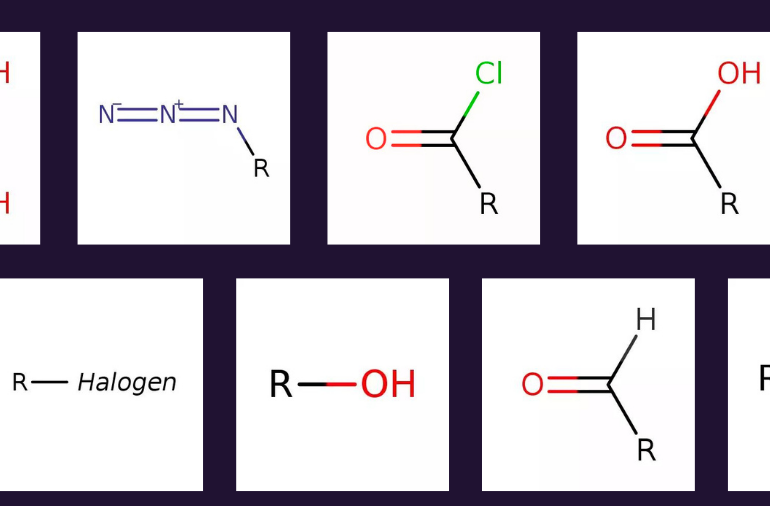
We are pleased to unveil an exciting addition to Molport’s platform that will enhance how you search for stock building blocks. Introducing the Functional Groups Directory, a powerful resource designed to simplify your compound exploration process. The Functional Groups Directory page on our website organizes compounds based on their functional groups, giving a structured approach to finding building blocks that align with your synthesis goals. This directory provides a comprehensive overview of functional groups, including…
Does non-standardized salt form data make you shake with frustration? As much as 5% of research compounds are sold in salt form – which can have better stability, solubility, bioavailability, and manufacturability than their parent compounds. But structure and property data are not always standardized and can experimental consequences! To learn more about the importance of salt forms and how metadata could be improved in #drugdiscovery, check out our article titled ‘Addressing the challenge of…
Molport natural compound database Identifying hit and lead molecules early on in the drug development process can make all the difference between a failure and a successful campaign. Typically, this is achieved through comprehensive screening campaigns with compound libraries screened directly against a drug target, or via more complex assays such as those involving cultured cells. In either case, extensive compound libraries must be assayed against the drug target via in silico, high throughput (HTS),…